Know What Your
Inverter Is Doing.
Always.

Real-time monitoring for Axpert & Voltronic solar inverters. See your power, battery, and solar production from any browser — whether you're at home or across the country.

Live inverter monitoring dashboard showing power stats, battery levels, and inverter status

Everything You Need To Stay In Control

Monitor your entire solar setup from one place — no subscriptions, no cloud dependency.

Live Updates Every Second

See your inverter's power output, battery state, and solar production refreshing in real time — no page reloads needed.

Beautiful Web Dashboard

Access charts, stats, and history from any device with a browser — phone, tablet, or desktop. Nothing to install.

Multiple Inverters

Running more than one inverter? Monitor them all from a single dashboard with individual stats and charts for each unit.

Multi-Site Management

Managing installations at different locations? A central dashboard aggregates everything into one view so you can check any site instantly.

Your Data, Your Hardware

Everything runs on your own equipment. No monthly fees, no cloud accounts, no sending your usage data to anyone else.

Full History & Trends

Every reading is stored automatically. Look back at yesterday, last week, or last month to spot patterns and track performance.

See It In Action

Real screenshots from a live installation.

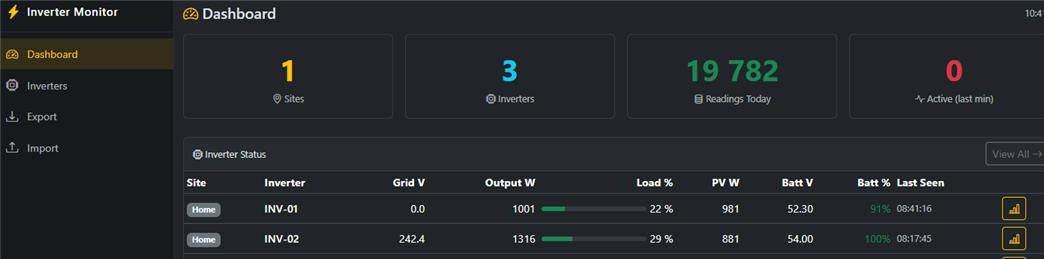
Central Dashboard
Dashboard showing site count, inverter count, readings today, and live inverter status table
Inverter Fleet
Inverter list showing device IDs, serial numbers, power output, battery percentage, and last seen timestamps
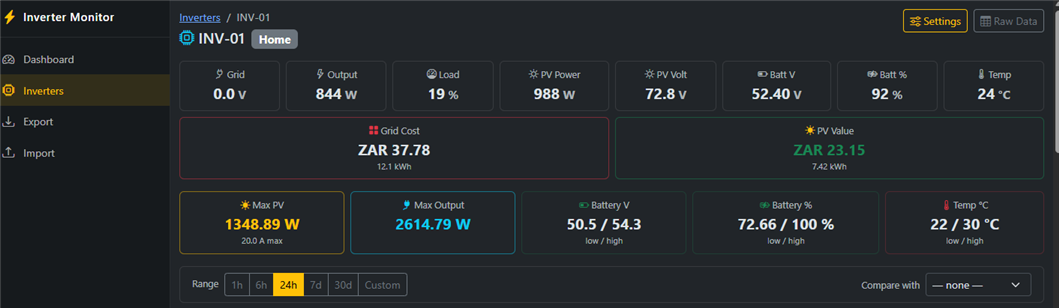
Inverter Detail & Cost Tracking
Individual inverter view showing live stats, grid cost, solar value, peak power, battery range, and temperature

Interactive Performance Charts

Drill into any time range — from the last hour to the last 30 days.

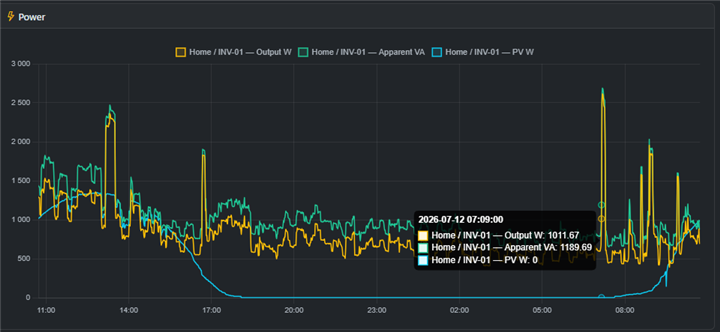
Power Output
Power chart showing output watts, apparent VA, and PV watts over 24 hours
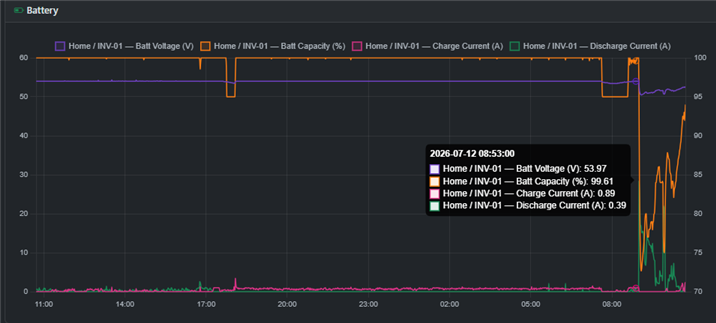
Battery Health
Battery chart showing voltage, capacity percentage, charge and discharge currents
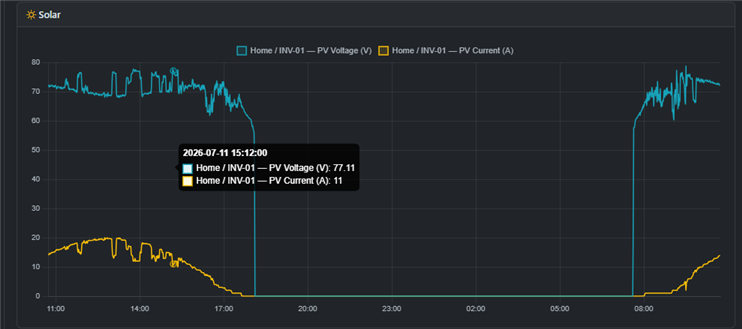
Solar Production
Solar chart showing PV voltage and current throughout the day
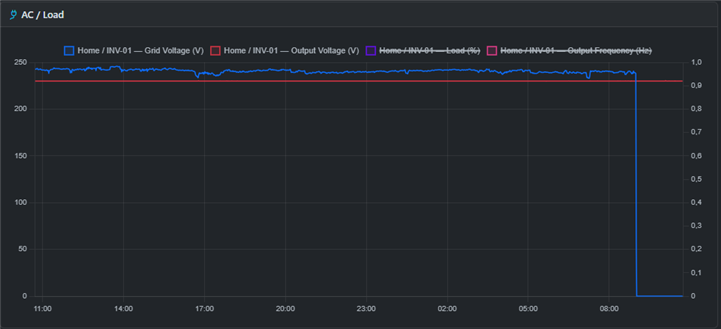
Grid & Load
AC chart showing grid voltage, output voltage, load percentage, and frequency

Inverter Details & Configuration

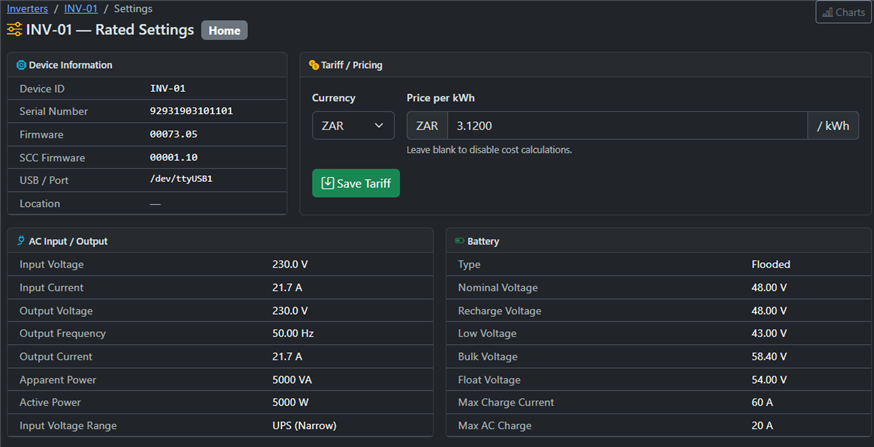
Device Settings & Tariff
Inverter settings page showing device info, serial number, firmware, and tariff configuration
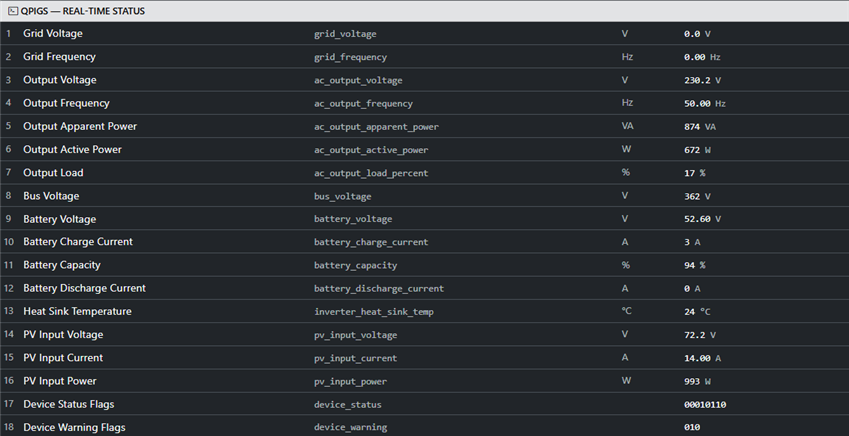
Live Readings
Real-time status showing all 18 inverter parameters updating live

How It Works

A small device connects to your inverter and does the rest.

Your Inverter

Axpert, Voltronic, or compatible model

USB cable

On-Site Device

Raspberry Pi or ESP module — reads and records every second

Internet

Central Server

Optional — view all your sites from one place

1

Connect

Plug a Raspberry Pi or ESP module into your inverter with a USB cable. The device automatically detects your inverter model and starts reading data.

2

Record

Every second, the device captures your inverter's full status — grid power, battery level, solar output, load, temperature, and more — and stores it locally. Your data never leaves your network unless you choose to sync it.

3

Monitor

Open the web dashboard from any browser to see live stats, interactive charts, and full history. If you manage multiple sites, a central server brings everything into one view.

What You Can Monitor

Every important metric, captured every second and displayed at a glance.

Power & Load

  • Grid voltage & frequency
  • Output voltage & power (W)
  • Current load as a percentage
  • Apparent power (VA)

Battery

  • Battery voltage
  • Charge level (%)
  • Charging & discharge current
  • Battery type & health

Solar

  • PV voltage & current
  • Solar power output (W)
  • Daily energy production
  • Production trends over time

System

  • Operating mode (grid / battery / fault)
  • Inverter temperature
  • Firmware & serial number
  • Configuration settings

Getting Started

A simple setup — plug in, configure, and start monitoring.

What You Need

  • Axpert or Voltronic-compatible inverter
  • Raspberry Pi or ESP module
  • USB cable to connect to the inverter
  • Wi-Fi or network connection

What You Get

  • Live dashboard accessible from any browser
  • Automatic data recording every second
  • Interactive charts and full history
  • Multi-site central management (optional)
01

Connect the device

Plug the Raspberry Pi or ESP module into your inverter via USB. It auto-detects the inverter model.

02

Run the setup wizard

Open the device's web page from your browser. A guided wizard walks you through configuration in minutes.

03

Start monitoring

Data starts flowing immediately. Open the dashboard to see live power, battery, and solar stats.

04

Add more sites

Optional: connect a central server to manage multiple installations from a single dashboard.

Self-Hosted. No Subscriptions. Fully Yours.

Your inverter data stays on your hardware — no cloud accounts, no monthly fees, no vendor lock-in.